

24 Dec Is Automated QC enough? What about review & collaboration?
12/24/2025 Is Automated QC enough? What about review & collaboration?

Click Play to listen to the article
For many years, Venera Technologies has been a leading provider of Automated Quality Control (AQC) solutions for professional media workflows. Our AQC products are deployed globally across broadcast, OTT, post-production, and content distribution environments, processing millions of audio, video, and subtitle assets every year – both in the cloud and on-premise.
A recurring theme we consistently hear from our customers is:
“Automated QC is essential, but by itself it does not solve all of our content quality process challenges.”
This raises an important question: What does Automated QC not address today, and how should media organizations bridge that gap?
Where Automated QC Fits in the Workflow
Automated QC can be applied at multiple points in a media supply chain, but one of the most critical checkpoints is content ingest – when assets are first received by a broadcaster, OTT platform, or service provider.
At this stage, the goal is to make a clear, and defensible, decision on whether content can proceed further in the workflow or requires intervention.
A typical QC decision workflow looks like this:
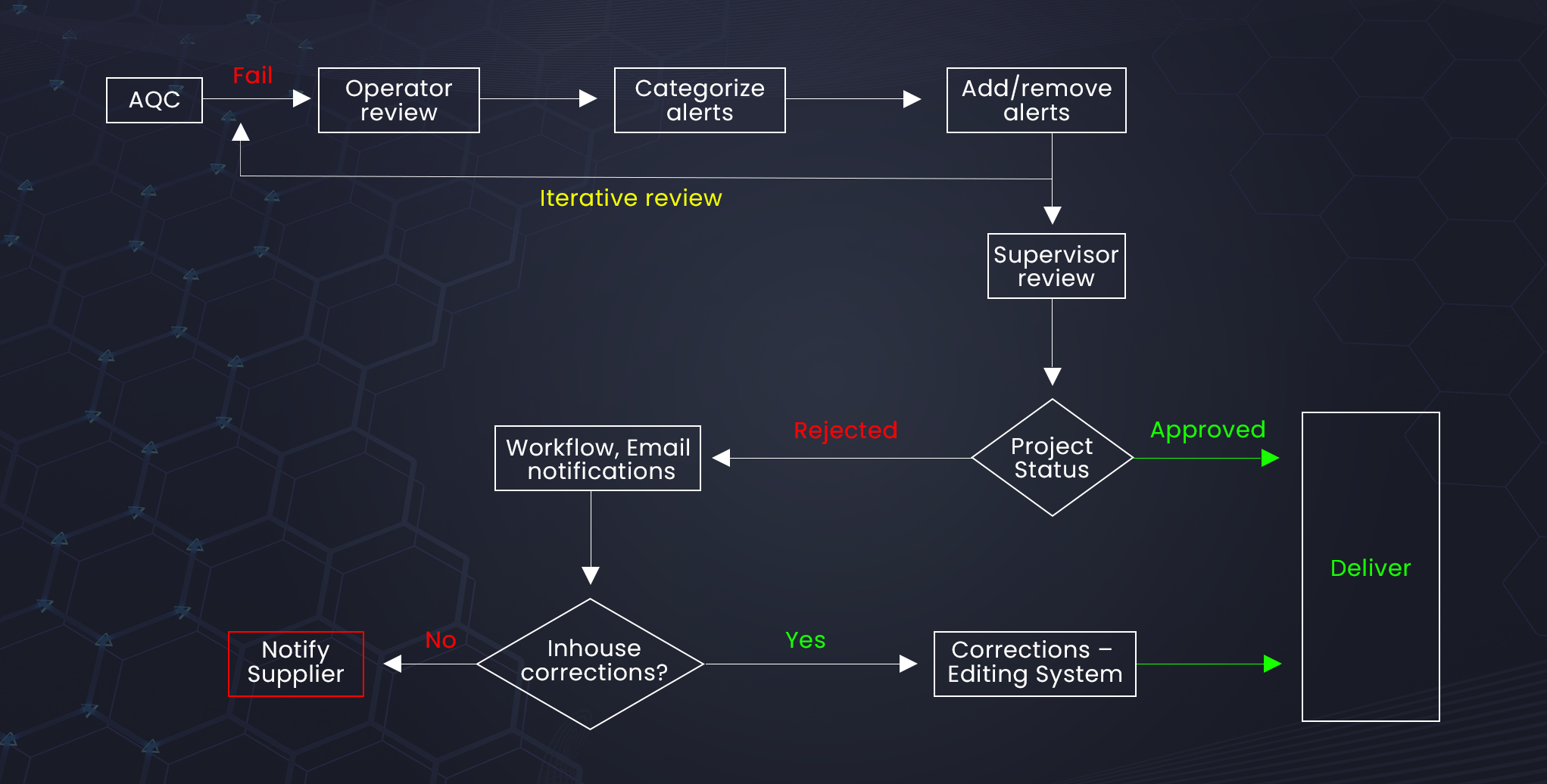
If the content is rejected:
- The rejection report may be sent back to the supplier, or
- The issues may be corrected in-house before re-submission.
While AQC is extremely effective at detecting objective, measurable issues, several critical challenges remain beyond pure automation.
Gaps That Automated QC Alone Does Not Solve
1. QC Report Review and “Creative Intent” Validation
One of the most common challenges with Automated QC is segments that are identified incorrectly as having issues. A segment flagged as an error by an AQC tool could, in reality, be a “creative intent”, meaning it is:
- a deliberate creative choice
- a stylistic effect
- a narrative-driven visual or audio anomaly
Or indeed it could simply be an incorrectly flagged segment, a “false positive”.
To validate this, operators typically take timecodes from the QC report and manually navigate to those locations using editing or playback tools such as Adobe Premiere Pro, Avid Media Composer, DaVinci Resolve, or standalone players. (It should be noted that in case of content that is in the cloud, the asset needs to be downloaded first, along with the QC report, so it can be reviewed on the on-premise editing tools).
This approach introduces several inefficiencies:
- In case of cloud-based content, the download process can be time consuming and costly (cloud egress charges)
- High-cost editing systems are used for simple review tasks
- QC and Review remain disconnected processes
- There is no mechanism to mark issues as “creative intent” or “false positive”
- Review decisions are not persistently associated with the asset
As a result, QC reports and review tools operate as isolated systems, with no shared context or audit trail.
2. Subjective and Custom Alerts
Many quality issues are inherently subjective and cannot be reliably detected through automation alone – for example:
- Editorial inconsistencies
- Compliance nuances specific to a platform or region
Operators must manually review the content and maintain separate notes outside the AQC system. These findings are often:
- Stored in spreadsheets or emails
- Disconnected from the original QC report
- Difficult to track or audit later
This fragmented approach significantly increases operational overhead.
3. Collaboration and Decision Governance
In real-world professional environments, QC decisions are rarely made by a single individual. Content may need to pass through:
- Multiple operators
- Peer reviews
- Supervisor or compliance approvals
Today, much of this collaboration happens informally—through emails, chats, or verbal communication—without a structured system to manage review states, approvals, and accountability. At scale, this becomes extremely difficult to manage.
4. Workflow Automation and System Notifications
Large media organizations rely heavily on automation. When an asset is accepted, rejected, or updated after review, downstream systems – MAMs, workflow engines, and analytics platforms – must be notified automatically.
Without a system that can integrate review outcomes into existing workflows:
- Metadata becomes inconsistent
- Manual updates are required
- Automation pipelines break down
5. Efficient In-House Corrections
When content issues are corrected internally, operators need precise and time coded issue lists from QC tools. Today, this often involves:
- Manually copying timecodes
- Navigating between systems
- Re-checking corrected segments
This process is time-consuming, error-prone, and inefficient at scale.
Introducing QCtudio®: Beyond Automated QC
Until these challenges are addressed holistically, organizations cannot fully realize the benefits of Automated QC. This is precisely why we introduced QCtudio®.
QCtudio is a QC review and collaboration system designed to complement Automated QC by accelerating and structuring all post-AQC actions.
What QCtudio Enables
QCtudio bridges the gap between automated detection and human decision making by providing:
1. Integrated QC Report Review
Review AQC findings directly with synchronized playback and timecode navigation on the content timeline.
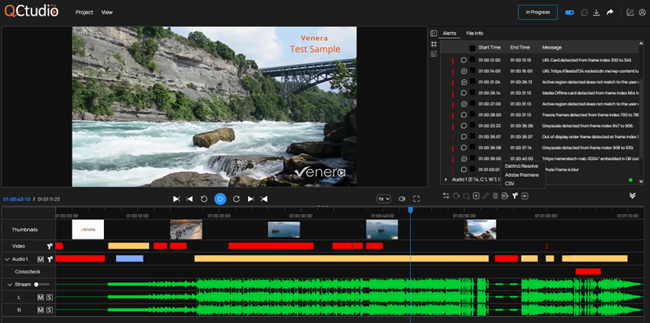
2. QC in the cloud, review in the cloud
For cloud-based workflows where the media is already in the cloud, there is no longer a need to download the asset locally for operator review. QCtudio provides the operator with the ability to review the content in the cloud. “What happens in the cloud, stays in the cloud!”
3. “Creative Intent” and “False Positive” Annotations
Explicitly mark issues as “creative intent”, “false positive” or “verified” — and persistently carry those decisions with the asset.
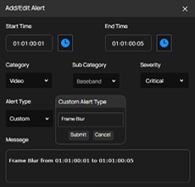
4. Custom and Subjective Issue Tracking
Add operator-identified issues alongside automated findings in a single system of record. Also, mark-up the issues in the video frame for easy identification.
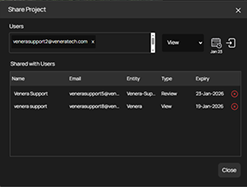
5. Structured Collaboration and Approvals
Enable multi-user reviews, supervisor validation, and governed accept/reject decisions. The asset can also be shared with supplier or customer for review or approval.
6. Workflow and API Integration
Automatically notify downstream systems of review outcomes and decision states using callback notifications. Various stakeholders can also be notified via email whenever the status of an asset is changed.
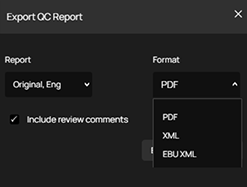
7. Standardized reports for interoperability
In addition to PDF formatted QC reports, provide machine readable (XML) standardize QC reports (Based on EBU QC standards) that ensures interoperability where downstream tools can directly read/digest the QC reports, or take
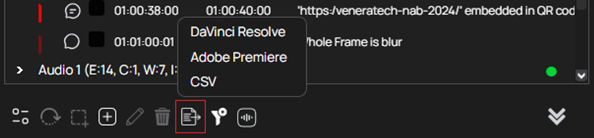
8. Correction-Friendly Review
Provide clean, exportable time-coded issue lists in editor specific timeline that can be efficiently used for in-house remediation. These timelines can be imported in the Editing system and all the comments will be displayed directly on the timeline within the editing system. This makes the correction operation easier.
Availability of QCtudio
QCtudio is available as a companion with Quasar, our native cloud audio/video QC solution. It will soon be available with Pulsar, our on-prem audio/video QC system too.
It is designed to fit into existing broadcast and OTT workflows with minimal disruption.
Final Recommendation
Automated QC is no longer optional – it is foundational. However, Automated QC alone is not enough. To achieve true operational efficiency, scalability, and quality governance, organizations must also address review, collaboration, and decision automation.
QCtudio was built specifically to solve these challenges.
