

14 Jul Burned-In Text Detection and Overlap Correction: Simplifying Subtitle QC with CapMate
Burned-In Text Detection and Overlap Correction:
Simplifying Subtitle QC with CapMate
Click Play to listen to the article
Introduction
Subtitle QC is much more than verifying subtitle timing, synchronization, reading speed, or formatting. An equally important aspect of subtitle QC is ensuring that subtitles do not interfere with important Burned-in text that is already embedded within the video.
This permanently embedded text, commonly referred to as Burned-In Text, is frequently used to provide viewers with contextual information such as locations, dates, translations, editorial graphics, or even subtitles that have been rendered directly into the video.
If a sidecar subtitle overlaps this text, it can reduce readability, obscure important information, or create duplicate subtitle presentation. As broadcasters, localization providers, and OTT platforms continue to process larger volumes of content, identifying and reviewing such issues manually becomes increasingly challenging.
CapMate simplifies this process by providing an intelligent workflow for detecting, classifying, reviewing, and auto-correcting Burned-In Text overlap issues. With automated subtitle repositioning for overlap scenarios, redundancy identification for Burned-In Subtitles, and streamlined review capabilities, CapMate helps reviewers significantly reduce manual effort while preserving subtitle readability and the integrity of important on-screen information.
Understanding Burned-In Text
Burned-In Text refers to any text that has been permanently embedded into the video image during production or post-production. Unlike sidecar subtitle files, Burned-in text becomes part of the video itself and cannot be turned off, edited, or repositioned independently.
Burned-in text may appear in various forms, including:
- Location and date identifier
- Character introductions
- Forced narrative translations
- Hardcoded subtitles
- Editorial graphics
Since this text remains visible throughout playback, subtitle placement must be carefully reviewed to ensure that both the subtitles and the Burned-in text remain clear and readable.
Types of Burned-in Text
Although all Burned-in text is permanently embedded within the video, not every type serves the same purpose. Understanding these categories helps reviewers determine how each type should be treated during subtitle QC.
Burned-in – Editorial Text
Burned-in – Editorial Textrefers to creative text intentionally added during production or post-production to provide viewers with contextual information.
Examples include:
- Foreign language translations
- Location cards
- Date and time indicators
- Character identifiers
- Storytelling graphics
These elements often contain information that is important for narrative understanding and should remain visible throughout playback.

Burned-in Subtitles
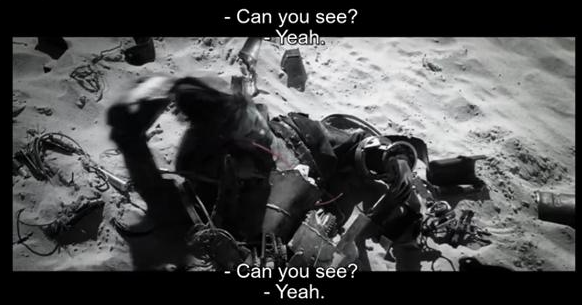
Burned-in – Subtitles refers to subtitles that have already been permanently rendered into the video during a previous localization or mastering process.
Although modern content delivery typically relies on sidecar subtitle files, Burned-in subtitles are still encountered in legacy masters, archived content, previously localized assets, and content received from third-party sources.
When a sidecar subtitle is delivered alongside Burned-in Subtitles, the content should be reviewed to determine whether the subtitle placement affects readability or whether the sidecar subtitle is unnecessary because the same dialogue is already available within the video.
Environmental Text
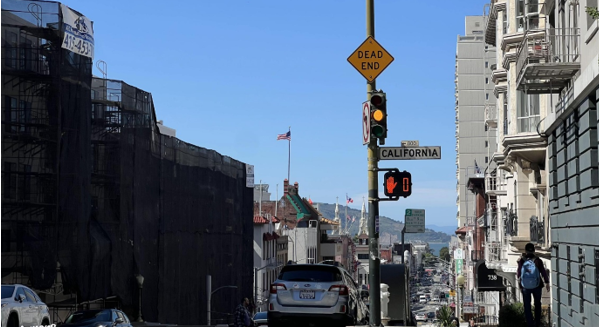
Environmental text refers to text naturally present within the scene and captured by the camera, such as:
- Street signs
- Shop names
- Billboards
- Posters
Unlike Editorial Text, Environmental Text is part of the visual environment rather than an editorial element. While it may not always require subtitle repositioning, identifying it separately enables reviewers to decide whether it is relevant to their specific review workflow.
What is Burned-in Text Overlap?
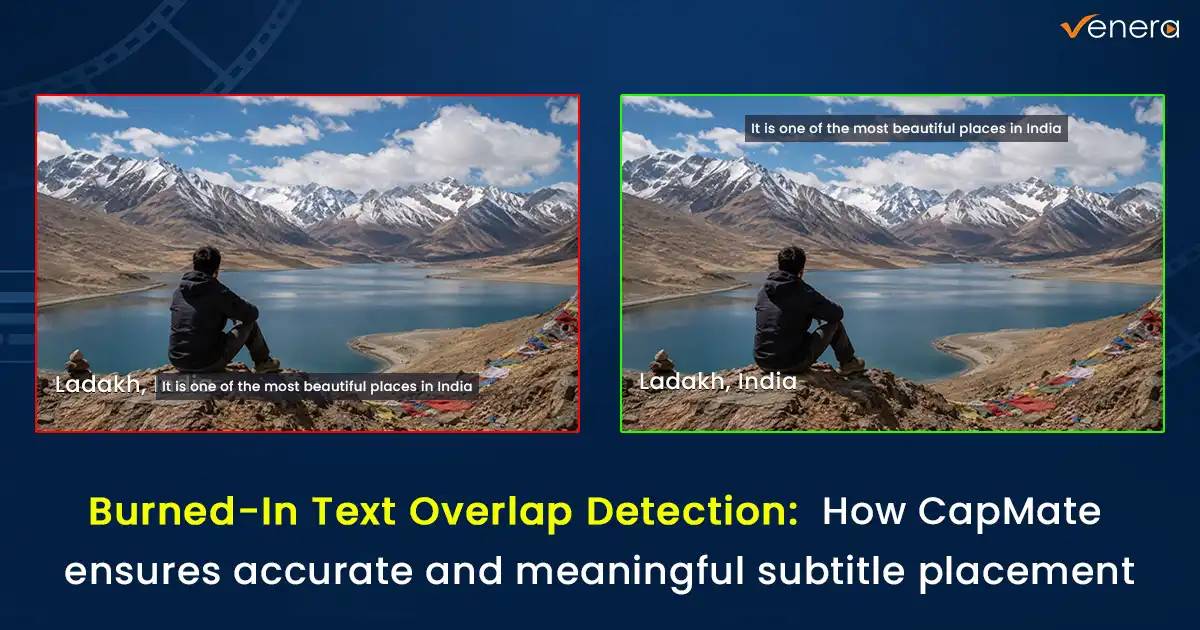
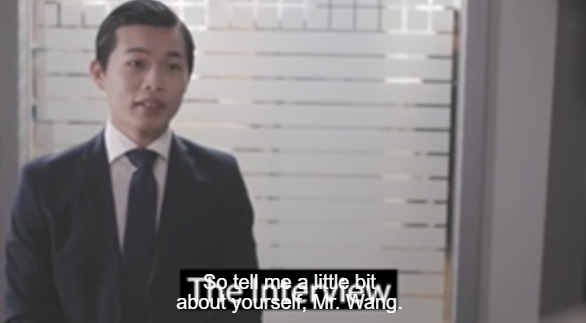
A Burned-in Text Overlap occurs when a sidecar subtitle occupies the same visual region as relevant Burned-in text within the video frame.
From a subtitle QC perspective, the most common overlap scenarios involve:
- Sidecar subtitles overlapping Burned-in – Editorial text , making important editorial information difficult to read.
- Sidecar subtitles overlapping Burned-in Subtitles, reducing subtitle readability and requiring further review.
These overlaps can result in:
- Reduced subtitle readability
- Obscured on-screen information
- Poor viewer experience
- Increased manual review effort
- Potential compliance issues for broadcast and OTT deliveries
Accurately identifying these overlaps is therefore an important part of subtitle quality control.
Challenges of Manual Burned-in Text Review
Reviewing Burned-in Text manually is one of the most time-consuming stages of subtitle QC.
Unlike subtitle files, Burned-in text contains no metadata indicating when it appears, how long it remains visible, or where it is positioned within the frame. Reviewers must therefore rely entirely on visual inspection.
A typical manual review process involves:
- Watching the entire video to locate every occurrence of Burned-in text.
- Determining the start and end timecodes for each detected text block.
- Identifying whether the text is Burned-in – Editorial Text, Burned-in Subtitles, or Environmental Text.
- Checking whether sidecar subtitles overlap relevant Burned-in text.
- Determining whether the sidecar subtitle should be repositioned or whether it is redundant because the same subtitle already exists as Burned-in – Subtitles.
- Manually adjusting subtitle placement wherever required.
For long-form content or large media libraries, this process becomes increasingly time-consuming and can lead to inconsistent reviews or missed overlap issues.
How CapMate Simplifies Burned-in Text Review
CapMate brings the entire Burned-in Text review workflow into a single interface, allowing reviewers to detect, classify, review, and validate Burned-in text more efficiently.
Every detected text block is automatically classified into one of three categories:
- Burned-in – Editorial Text
- Burned-in Subtitles
- Environmental Text
Each detected text block is displayed individually along with:
- Start and end timecodes
- Detected text
- confidence score
- Assigned category
Reviewers can edit OCR-extracted text, change the assigned category whenever required, filter detections by category or confidence score, ignore text blocks that are not relevant to their workflow, and export either all detected text blocks or only selected entries.
This centralized workflow significantly reduces the effort required to review large volumes of Burned-in text.
Intelligent Auto-Correction and Validation
CapMate not only detects Burned-in Text but also assists reviewers in resolving subtitle conflicts.
For Burned-in -EditorialText, CapMate evaluates subtitle placement across the lower, middle, and upper regions of the frame. Since subtitles are conventionally positioned in the lower third, valid overlaps detected in this region are automatically corrected by repositioning the subtitle to avoid obscuring the Burned-in text. Overlaps detected in the middle or upper regions are reported for editorial review, allowing reviewers to determine the most appropriate subtitle placement.
For Burned-in Subtitles , CapMate performs an additional validation during the review process. If the sidecar subtitle contains the same dialogue as the detected Burned-in – Subtitles, CapMate reports it as a Redundant Subtitle, helping reviewers identify duplicate subtitle presentation rather than simply repositioning the subtitle. If the dialogue differs, reviewers can reposition the subtitle where necessary to improve readability.
By distinguishing between subtitle overlap and subtitle redundancy, CapMate enables reviewers to apply the appropriate corrective action for each scenario.
Flexible Review Modes
Once Burned-in Text has been detected and classified, CapMate provides dedicated review modes to simplify validation.
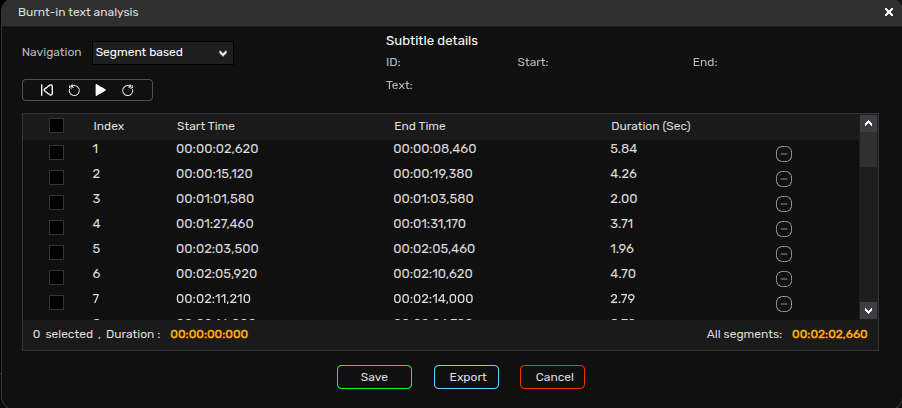
Segment-Based Review
Segment-Based Review allows users to review detected text according to when it appears in the video. Each detected text block is linked to its corresponding start and end timecodes, enabling quick navigation and validation alongside video playback.
Text-Based Review
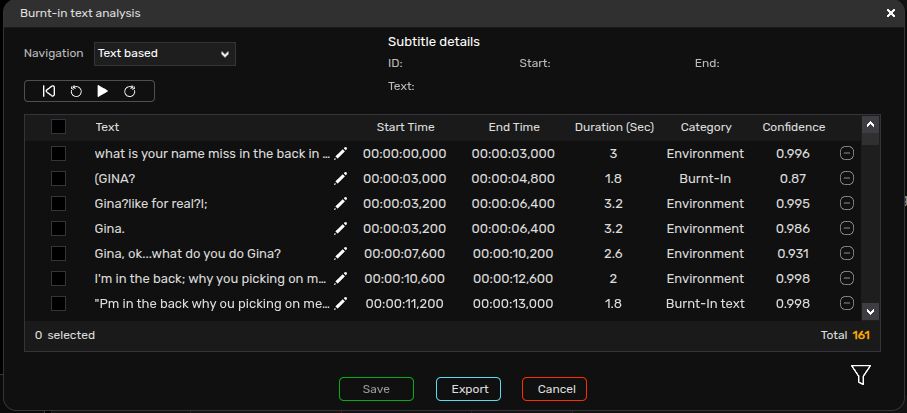
Text-Based Review presents all detected text blocks in a structured list together with their category, confidence score, and timing information.
Reviewers can quickly filter results by category or confidence score, update the detected category, edit OCR-extracted text, ignore irrelevant text blocks, and export all or selected detections, allowing them to focus on the most relevant review items.
Conclusion
Burned-in Text review is an essential part of modern subtitle QC, but manually reviewing every occurrence can be both time-consuming and error-prone. Identifying Burned-in text, determining its duration, validating subtitle overlaps, distinguishing between different types of Burned-in text, and manually correcting subtitle placement all require significant effort—especially for long-form content and large media libraries.
CapMate simplifies this entire workflow by combining automated Burned-in Text detection, intelligent classification, overlap validation, redundancy detection, centralized review, flexible filtering, and automatic subtitle repositioning within a single solution.
By reducing manual effort while improving review accuracy, CapMate enables broadcasters, localization providers, content owners, and OTT operators to deliver subtitles that remain readable, preserve important on-screen information, and provide viewers with a cleaner, more accessible viewing experience.
